Digital signage for hotels works when every screen has one job, set by where it hangs. The lobby screen welcomes guests and answers the questions they would otherwise ask at the desk: the weather, check-out time, the Wi-Fi, where breakfast is served. The screen on the meeting floor says which event is in which room. The one at the restaurant door shows what is being served now, and someone on the team swaps breakfast for lunch from a phone in seconds. All of them run from one dashboard, go to standby outside their working hours, and each needs only a display and a small player behind it. For what SignageStack does across a hotel, see digital signage for hotels; this article goes screen by screen through what to show.
What hotel screens should not do is try to do everything at once. A lobby loop of fifteen slides, half of them for the spa, is background by the second morning of a stay. A few items chosen for the spot get read.
Which screens does a hotel need?
Start from the guest's route through the building, not from a list of features.
Area | Its job | What goes on it |
|---|---|---|
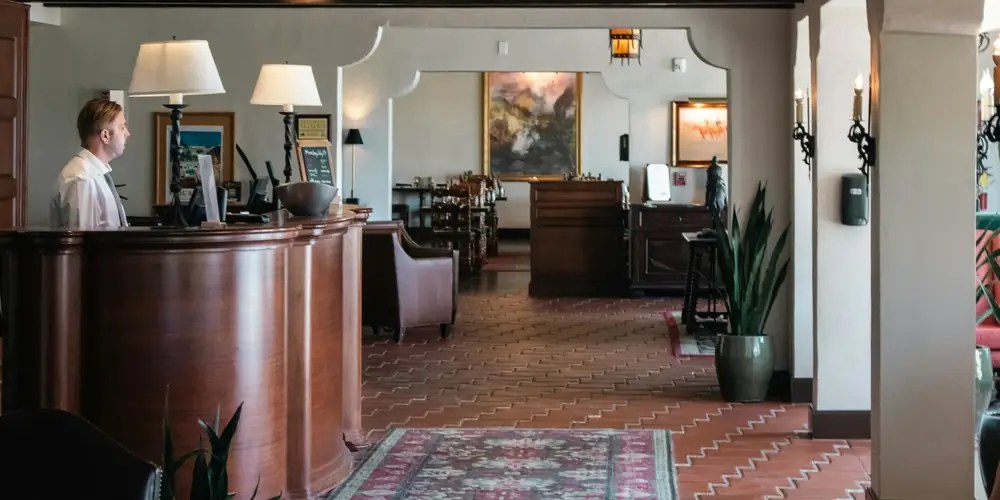
Lobby and reception | Welcome and orient | A welcome, the weather, today's events, check-out time, a Wi-Fi QR code |
Meeting and event floor | Get people to the right room | Today's events by room, a welcome for the group |
Restaurant and bar entrance | Show what is served now | Breakfast, lunch or dinner menu, opening hours |
By the lifts and the exit | The practical last word | Weather, shuttle times, the nearest stop, late check-out |
Back of house | Keep the team informed | Rota, notices, training dates |
One thing to settle early: SignageStack runs the screens in public areas, not the TVs in guest rooms. It does not connect to a property management system, so it cannot greet a guest by name or pull event bookings out of your sales and catering software. The screens show what you put in the dashboard, or what a connected Google Calendar or Google Sheet holds.
The lobby screen
The lobby is where one screen has to do several jobs, and the Zones app is how it does them. It splits the display into panels: a welcome message in one, the weather and a clock beside it. Each panel runs its own content on its own timing. A ticker band along the bottom, which runs over the Zones layout, carries the lines every guest needs: "Check-out until 11:00", "Breakfast 6:30–10:30, first floor", "Airport shuttle every hour from the main entrance".
What earns a place in the lobby:
- Weather for your city: current conditions and a forecast, updated by itself. Guests check it before they head out, and it keeps the last forecast on screen if the network drops.
- A Wi-Fi QR code. The QR code app can make a code that joins a network when scanned. The code carries the password, so point it at the guest network, never at the one your front-office systems run on.
- A review QR code that opens your Google review form. Put it by the exit, where guests leave, rather than at check-in.
- Exchange rates. The Exchange rates app shows daily reference rates for up to twelve currencies against a base you choose. They are one rate per currency, not buy and sell prices. If your front desk changes money, make sure nobody mistakes them for your rates.
- News headlines from BBC News, The Guardian, CNN, Deutsche Welle's English service and others, each story with a QR code so a guest can finish it on their phone. These are headlines and photos, not a TV channel.
- A live channel, if you want one. The Live stream app plays HLS and DASH streams and live links from YouTube or Twitch. It needs the internet, and the right to show a broadcast in a public area is yours to obtain.
One limit to know before you plan a wall of clocks: the Clock app shows the screen's local time only. A row of clocks for New York, London and Tokyo is not something it does.
Meetings and events
If your meeting rooms are booked in Google Calendar, one calendar per room, the Google Calendar app shows them on the screen outside. Connect the account once, pick the calendar, and choose the Schedule view with "Only show upcoming events" switched on so finished sessions drop off. New, moved and cancelled bookings reach the screen by themselves within a few minutes. The connection is read-only, so nobody can book or cancel anything from the screen.
Two practical points:
- Titles are what guests read. Write event titles for the screen, such as "Regional sales meeting, Room Salzburg, 2nd floor", rather than an internal booking reference. If a calendar also holds details guests should not see, share only free/busy with the connected account and those slots appear as busy without their details.
- One calendar per app. For several rooms, add the app once per room and put them side by side with Zones; the Window layout holds four panels. Our guide to the meeting room display goes through this step by step.
If your events live in a system that does not feed a Google Calendar, there is nothing to pull from. Two workarounds do the job: a Google Sheet with the day's events, which the Google Sheets app re-reads every minute, or a Text slide typed each morning.
For a group, a welcome slide ("Welcome to the annual conference of…") is worth the minute it takes. Put the group's check-out date in the front-office diary and switch the slide off, or delete it, that morning. And if an event organiser pays for sponsor slides on your screens, the proof-of-play reports show when each one played, exported as a PDF.
Restaurant, bar and breakfast room
The Menu board app puts the menu on a screen in one of eleven designs, landscape or portrait, with your logo, colour and currency. Categories become pages, so a long dinner menu gets more pages rather than smaller type. Make one board for breakfast and one for dinner and add both to the restaurant screen. SignageStack does not switch between them by time of day on its own, so when breakfast ends, switch the breakfast board off and the dinner board on; it takes seconds from a phone and reaches the screen in seconds. Because the menu is stored on the device, it keeps playing if the network drops in the middle of service. Allergen notes fit in each item's description line.
The board does not sync live from a spreadsheet. A menu that already lives in one comes in once as a CSV, and after that a change is a quick edit in the dashboard. Our guide to digital menu boards covers layout, photos and changing menus through the day in more detail.
Guests who read other languages
The dashboard runs in English, German, Serbian, Spanish and Italian, which helps your staff more than your guests. On screen, most of what guests see is what you typed, in whatever language you typed it: welcome messages, the ticker, the menu, event titles. A few apps have fixed labels. Weather and Google Calendar show theirs in the language you pick in their Language setting (English, German, Spanish, Italian or Serbian), and the ready-made news apps read English-language feeds.
What works in practice:
- One Text slide per language in the same playlist, each carrying the same message. As a rule of thumb, three languages are about as many as a loop can hold before guests wait too long for theirs.
- Information that needs no translation: times, floor numbers, arrows, prices, QR codes.
- The one line that must never be missed, such as check-out time or the way to the fire exit, in two languages in the ticker, where it is always on screen.
Getting guests on their way
There is no public transport app in the catalogue. If your local transport operator publishes a departure board as a public web page, the Web page app can show it, provided the page allows itself to be embedded. The preview in the dashboard tells you in a minute; a page that refuses stays blank, and nothing on our side can change that. Where it does not work, a QR code to the journey planner and a Text slide with the nearest stop, the line and the walking time are nearly as useful. A second QR code can call your usual taxi firm.
Planning the hotel day
SignageStack does not change content by time of day by itself, so what follows is what someone switches on and off as the day turns, in seconds from a phone. Much of it can share one loop all day.
- Mornings: weather, today's events, breakfast hours, check-out time.
- Evenings: the restaurant and bar, spa hours, tomorrow's weather.
- Weekends: brunch, local markets, a late check-out offer, switched on for Saturday and off again on Monday.
- Seasons and one-offs: Christmas dinner, a trade fair in town, each with its end date in the front-office diary so someone switches it off on time.
- Working hours: the meeting-floor screen can go to standby at night and at weekends while the lobby stays on around the clock.
Working hours are evaluated on each device, so a screen goes to standby and comes back on time even when the network does not cooperate. For an evacuation, the Emergency Alert app covers every chosen screen with a prepared message within a second. It is silent and works alongside your fire alarm, never instead of it.
Hardware for hotel spaces
- Displays. A lobby screen runs all day and much of the night. A consumer TV is built for a few hours a day; a commercial panel is rated for 12 to 24. This is exactly where the commercial display earns its price. Our comparison of digital signage displays and TVs goes into the detail.
- Size by distance. The rule of thumb from our hardware page: the furthest reader should be no more than six screen heights away for large text, and four for a menu read line by line. A reception read from 3–5 m wants 43–55"; a lobby read from 5–8 m wants 55–75". By the restaurant door, a portrait screen often fits better than a wide one.
- Players. One small Android box per screen: Android 8 or newer, 2 GB of RAM or more, wired ethernet where you can run it, and automatic power-on after a power cut. Samsung (Tizen) and LG (webOS) displays have no native SignageStack app, so put a box behind them. A TV running Android TV or Google TV can install the app directly.
- Network. Keep the screens off the guest Wi-Fi and on ethernet or the staff network. The player needs only outbound HTTPS, and it downloads media once and caches it, so bandwidth matters on the day you install rather than every day after.
What does digital signage for hotels cost?
€11 per screen per month, or €100 per screen per year, excluding VAT. Every feature and every app is in the one plan, and there is no setup fee. Three screens (lobby, meeting floor, restaurant) come to €300 a year on annual billing, plus hardware. For a hotel group, Enterprise adds volume pricing, a signed DPA, an uptime SLA and onboarding.
Where to start
Start with the lobby. Pair one screen, build a Zones layout with a welcome message, the weather and a clock, and add a ticker with check-out time and breakfast hours. Leave it for a week and ask the front desk which questions they stopped hearing. Then do the breakfast room. The trial runs for 21 days with every feature on one screen, and needs no card.